创建NAT服务器

使用Amazon Linux,从头搭建一个NAT服务器。

启动实例

在EC2上安装AmazonLinux的一个实例。

关闭源/目标检查

选择对象EC2,关闭源目标检查
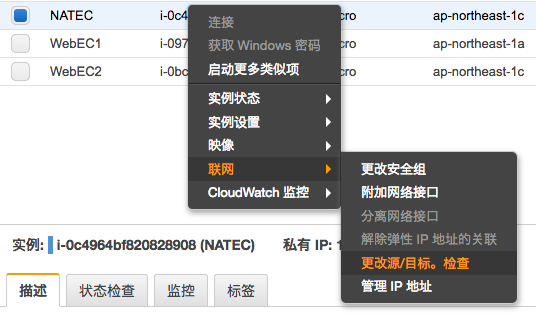
配置NAT服务器

用SSH登陆服务器

1
ssh -i common.pem ec2-user@54.92.57.144

更新系统

1
sudo yum update

安装iptable services

1
sudo yum install iptables-services

设定iptables的自动启动

1
2
$ sudo systemctl enable iptables
Created symlink from /etc/systemd/system/basic.target.wants/iptables.service to /usr/lib/systemd/system/iptables.service.

设定IPv4转发

修改文件

1
2
3
sudo vi /etc/sysctl.conf
输入
net.ipv4.ip_forward = 1

设定反应

1
2
$ sudo sysctl -p
net.ipv4.ip_forward = 1

设定转发规则

规则输入

此处设定的 CIDR[10.0.2.0/24] 是指的请求方的,根据个人环境的实际情况来设定。

1
$ sudo iptables -t nat -A POSTROUTING -s 10.0.2.0/24 -j MASQUERADE

确认规则

1
2
3
4
5
6
7
8
9
10
11
12
13
$ sudo iptables -t nat -L
Chain PREROUTING (policy ACCEPT)
target prot opt source destination

Chain INPUT (policy ACCEPT)
target prot opt source destination

Chain OUTPUT (policy ACCEPT)
target prot opt source destination

Chain POSTROUTING (policy ACCEPT)
target prot opt source destination
MASQUERADE all -- 10.0.2.0/24 anywhere

规则保存

1
2
$ sudo service iptables save
iptables: Saving firewall rules to /etc/sysconfig/iptables:[ OK ]

重新启动EC2,并再次登陆

确认配置

1
2
3
4
5
6
7
8
9
10
11
12
13
$ sudo iptables -t nat -L
Chain PREROUTING (policy ACCEPT)
target prot opt source destination

Chain INPUT (policy ACCEPT)
target prot opt source destination

Chain OUTPUT (policy ACCEPT)
target prot opt source destination

Chain POSTROUTING (policy ACCEPT)
target prot opt source destination
MASQUERADE all -- 10.0.2.0/24 anywhere

确认NAT转发

上传pem文件

使用sftp登陆

1
2
3
4
5
$ sftp -i common.pem ec2-user@54.92.57.144
Connected to 54.92.57.144.
sftp> put ./common.pem
Uploading ./common.pem to /home/ec2-user/common.pem
./common.pem

登陆DBEC

这儿是内网IP

1
$ ssh -i common.pem ec2-user@10.0.2.197

测试外网连接

1
2
$ curl http://httpbin.org/ip
{"origin":"54.92.57.144"}